
Everything you’d expect.
The complete set. No modules to buy separately.
Show me
01
Clients & Contacts
1
Global attendee database
Every contact your organisation has hosted, across every event, on one record.
2
Companies
Contacts grouped under the companies they belong to.
3
Engagement history
Which events each contact was invited to, attended or declined, kept on their record.
4
Preferences and requirements
Dietary, access and contact preferences, captured once and carried to every event.
5
Consent and permissions
What each contact has consented to, recorded and applied.
6
Segmentation and lists
Contacts filtered and grouped into reusable lists.
02
Events
Set up
Event creation
A new event opened from a template, with its record started at the same moment.
Controlled templates
Locked centrally. The event manager fills in what varies and cannot alter the governed structure.

Template library · maintained centrally
Brand and legal footerLocked
Approval routingLocked
Registration fieldsLocked
Event name · date · venueEditable
Agenda and sessions
Sessions, speakers and timings on one agenda.
Registration and forms
Registration pages and forms built from the template’s fields.
First Name *Conditional
Free text
Mandatory
Last Name *Free text
Email address *Free text
Dietary requirementsDropdown
Questions
Short answerParagraphMulti choiceDropdownSingle choiceSection
Built from the template’s fieldsEvent websites
An event website published from the same record, on the locked brand.
Collections
A repository of data points for the event: speakers, companies, documents, or custom.
Table planner
Seating plans for dinners and hosted tables, with guest placement against hosts and companies.
Invite
Invitations
Invitations sent, tracked and followed up from the event record.
Notifications and comms engine
Emails and notifications sent from the event, on its templates.
On the day
Attendee app
The event in the guest’s hand: their schedule, the agenda and their details.
Live polls
Polls run in a session, answered from the attendee app.
Q&A
Questions taken from the room, moderated before they show.
Host and onsite app
Arrivals and schedule changes for the team on the day.
Live wall
A live display for the room, fed by the event.
Afterwards
Surveys
Feedback collected against the event and held on its record.
03
Workflow & Budgeting
Stage 1 of 5
Event Requests
A structured request opens every event, so nothing starts as an email.
Stage 2 of 5
Approvals
Sign-off routed to the right approvers before an event exists.
Stage 3 of 5
Budgets, event level
An approved envelope per event, with spend recorded against it.
Stage 4 of 5
Budgets, period level
Budgets held at programme or period level, drawn down by events.
Stage 5 of 5
Finance export
Spend data out to Finance in the format they take.
Finance exportSent to Finance ✓
Q4 Client Summit · £43,540CC-4700
Recharged to Private Banking · in the format they take
04
Meetings
1
Meetings Booker
1:1 and group meetings requested and booked against host availability.
5
Location Library
Rooms and venues kept as records and attached to meetings.
6
Calendar integration
Confirmations arrive with the calendar invite attached.
4
Meetings Manager
The whole programme on one calendar: every host, room and slot.
2
Meeting Programmes, host-led
Hosts publish availability; guests are booked into it.
3
Meeting Programmes, mutual match
Both sides state preferences and the programme matches them.
7
MS Teams integration
Meetings carry their Teams details with them.
8
Zoom integration
Virtual sessions with Zoom on the invitation.
05
Hospitality & Allocations
1
Allocations
Tickets, tables and boxes held as inventory and committed to owners.
2
Attendee selection
Owners fill their share with named guests.
3
Restricted parties and conflicts
Guests checked against restricted lists before the invitation goes out.
4
Travel allocations
Travel held and allocated with the same controls as seats.
5
Policy thresholds and rules
Value limits and rules applied when a seat is promised, not after.
6
Declarations and attestations
The declarations your policy requires, captured at booking.
7
Compliance reporting
The register of who was hosted, at what value, by whom.
06
Stakeholder access
1
Stakeholder Portal
A scoped view for the people around the event, not just its organisers.
4
Event Requests form
Anyone entitled to ask for an event does it through the form.
2
Shareable attendee lists
Live lists shared with named stakeholders, always current.
3
Attendee dashboards
Each stakeholder sees their own guests and their status.
5
Compliance review dashboard
The queue of items waiting on Compliance, in one place.
6
Meetings review dashboard
The meetings position for reviewers, who see everything and approve nothing here.
7
Rep dashboard
A relationship owner’s view of their invitees across events.
07
Reporting & Analytics
Platform-wide dashboards
The whole programme’s position, live.
Standard reports
The reports every programme needs, ready without setup.
Custom report builder
Reports built from the platform’s own data, saved and rerun.
Scheduled exports
Packs that send themselves on a cadence.
Data warehouse feed
Event data delivered into your warehouse.
08
Platform foundations
Identity model
One person, one record, seen at firm level and at event level.
AK
One record
Firm view
Event view
Tenant administration
Your organisation’s own space, administered by your own people.
Halcyon Capital
Your tenant · 3 administrators
User management
Accounts created, suspended and removed by your administrators.
Daniel OseiActive ✓
M. RuizSuspended
Roles and permissions
Everyone sees only their part.
Event managerOwn events
RepOwn invitees
Enterprise authentication
SAML-based SSO with your identity provider.
eventogy
Continue with SSO
SAML · your identity provider
Audit trail
Who did what, when, kept on the record.
09:41L. Chen approved the budget
09:12J. Ward committed Box A
Data retention
Held for as long as your policy says, then gone.
Guest records · 6 yearsThen deleted
Financial records · 7 yearsThen deleted
09
Integrations
Open API
Programmatic access to the platform’s own data.
GET · /events200 ✓
GET · /attendees200 ✓
eventogy
One platform
CRM integration
Salesforce, InterAction and Dynamics, two-way.
Salesforce ⇆ eventogyTwo-way ✓
InterAction
Dynamics
Approved-model data layer
Your own approved AI model can query Eventogy. We do not ship a model to you.
Your approved model → eventogyQuery allowed ✓
No model shipped to you
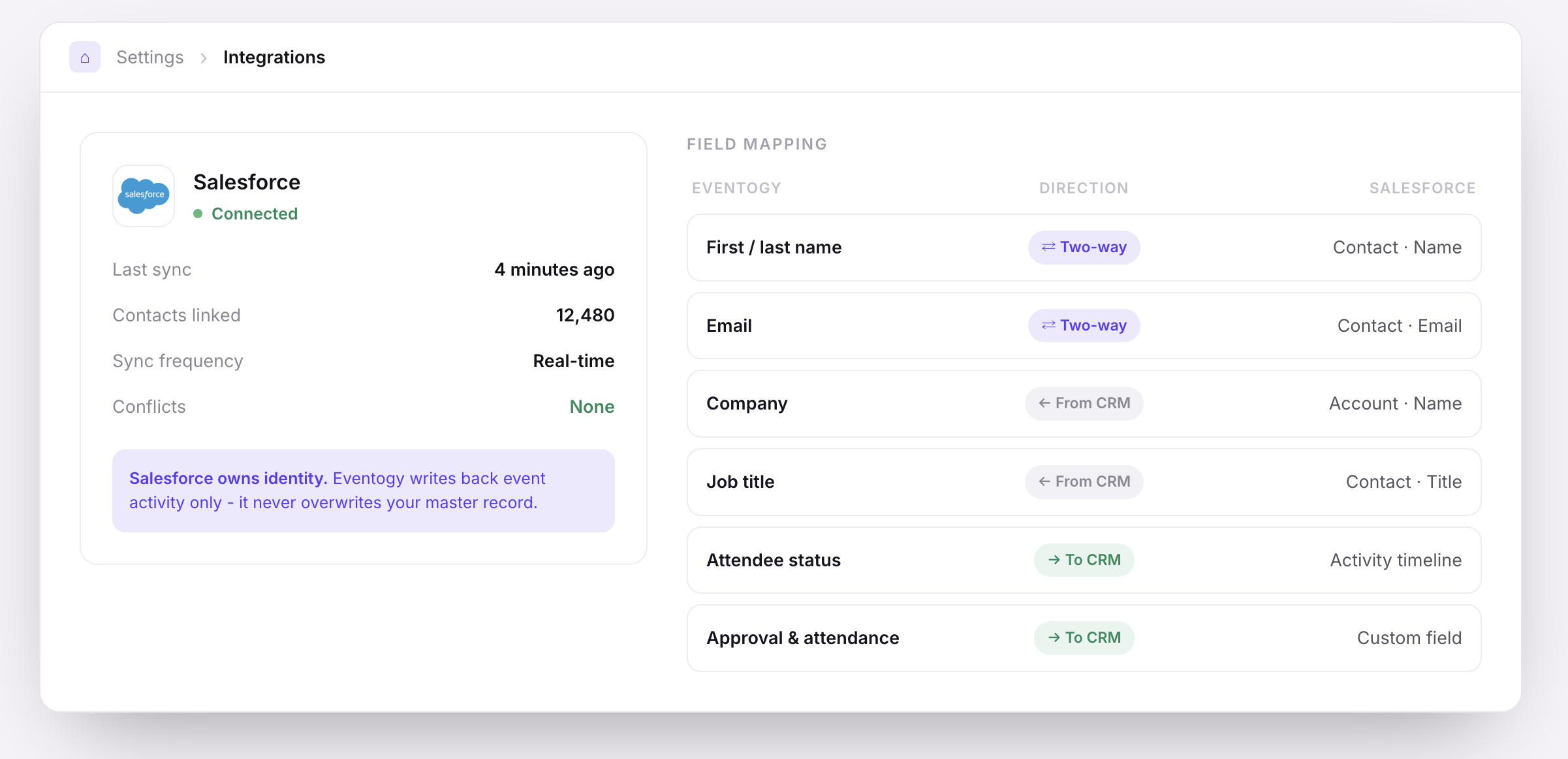
Field mapping
Salesforce owns identity. Eventogy writes back event activity only.
10
AI
1
Build with AI
An admin describes the event once; the platform builds it on the governed template, with approvals still applying.
2
AI attendee assistant
Attendees ask about their own event; answers come from their own record.